Instagram auto commenting, as the name implies, is the process of automatically placing comments on the Instagram platform. However, there are two ways that commenting can be automated, and each for a different purpose. The first is replying to comments left on your own posts, either with a reply comment or with a DM reply. The second is commenting on other people's posts, ideally on content that is going viral, so that your brand appears in front of an audience outside of your own following.
These two methods of commenting can be called inbound and outbound commenting, respectively. This guide is a complete reference for why a marketer would choose to do each one, what Meta's rules say about them, what the tools cost in this space, and how to do either without putting your account at risk.
TL;DR summary
- When it comes to inbound commenting, Meta's spam policy is more sensitive about frequency than about automation itself. Inbound replies can be entirely automated via Meta's official API, while outbound commenting has no official Meta API (for comment publishing), which makes the options for automating it much more limited.
- Replying to comments on your own posts is a proven way to increase engagement. Buffer measured a 21% engagement increase on Instagram posts across creator accounts that actively responded to comments.
- Outbound commenting reaches people outside your following, and brands are picking up tens of thousands of likes just by commenting early on posts that take off.
- To get started with Instagram comment automation, you can expect a price range of roughly $29–$95/mo across major tools.
What even is Instagram auto commenting?
Auto commenting covers everything from an automation that responds to a pricing question under your Reel to a system that finds a post going viral in real time and places a comment on it before it hits 3 million views. We'll walk through an explanation of each type, starting with inbound.
What is inbound auto commenting
Inbound Instagram comment automation watches the comments on your own content and responds to them. Usually you'll set up a keyword trigger. You tell the tool that any comment containing "link", "price", or "how much" should get a specific reply, and the tool sends that reply when it sees the word.
You can take this a step further with comment-to-DM automation. Comment-to-DM automation brings conversations with followers from the comments section to your DM inbox. It's the best way to build a funnel that drives interested followers from your posts to your chosen method of monetization.
Let's say a follower comments "does this ship to Canada". That shows time-sensitive buying intent that should be nurtured in a direct message conversation. The automation will reply publicly, then open a DM thread where you can actually answer, qualify, or even sell.
Inbound automation runs on Meta's official Graph API. Instagram knows the tool is there, the tool is authorised against your account, and the permissions are explicit. This is why the associated risks with inbound auto commenting are less about getting banned and more about hurting your brand. If your replies show any hint of being AI or automated, your followers will call it out and you risk loss of trust and reputation across your following.
What is outbound auto commenting
Outbound is what people usually mean when they search for an Instagram comment bot or an auto commenter. This kind of automation posts comments on posts you did not make in order to garner attention from audiences outside of your own.
There is a fine line between spam and innovative marketing here. Large consumer brands comment on other accounts' posts as standard practice. You've likely seen it before in your own feed, and it works. A good comment on a post with a million views is cheaper and more visible than most paid placements. When done at a reasonable frequency, with a person approving each comment before it goes out, outbound commenting is a safe and common practice.
Fully unattended bulk commenting is what will get your account restricted. A script that fires hundreds of generic comments an hour is exactly the behaviour Meta's spam policy describes. Needless to say, it is difficult to automate the process of outbound auto commenting while staying within Meta's policy jurisdictions.
Inbound vs outbound auto commenting at a glance
| Inbound | Outbound | |
|---|---|---|
| What it does | Replies to comments on your posts | Posts comments on other people's posts |
| Why you would do it | Convert attention you already earned. Answer every commenter fast to build engagement or move buying intent into a DM before it dissipates | Reach people who wouldn't have found you otherwise. Essentially borrow the audience of a post that's already going viral |
| The job it replaces | A person watching your notifications all day | A person hunting trending posts and commenting early |
| Who you reach | People already engaging with you | People who have never heard of you |
| Official API | Yes, Meta Graph API | No API exists |
| Existing tools | ManyChat, Spur, Kommo, ReplyKaro | PhantomBuster, open-source bots |
| Entry price | $0–$29/mo | $0–$56/mo |
| Main risk | Robotic replies damaging your own brand | Account restriction; spam reputation |
Inbound is easier to automate safely and its upside is capped by how much attention you already have. Outbound is harder to do well, but there is no ceiling on the audience you can reach with it.
How effective is auto commenting on Instagram?
Inbound commenting effectiveness
When it comes to inbound, the numbers are pretty straightforward. Buffer analysed posts across Instagram and other platforms and found that creator accounts which actively replied to comments saw engagement rise by 21% on Instagram.
And this makes sense. By consistently replying to follower comments you're making sure your followers feel heard, and people who feel like their voices matter are more likely to participate in conversation. You're also sending a stronger signal to the algorithm that the post is worth showing to more people. More people = more engagement.
Outbound commenting effectiveness
When it comes to outbound, there is actually very little data available, because comment rank is not visible in any standard Instagram analytics tool. So we measured it ourselves. The figures below come from a study of our own user's outbound comments:
- Our user's comments have earned 248,523 likes across 2,460 comments.
- The single best comment earned over 40,000 likes at rank 9.
- 4.8% became the #1 top comment on the post they were posted under.
Given these numbers, it's easy to see why outbound commenting is hard to do manually. The top percentage of comments get all of the likes, and you only get a top ranking comment every 20 comments you make. That's why automation is essential here. By cutting the time it takes to find a video and place the comment down to under a minute, you turn the task from a morning-long routine into a 15-30 minute habit. At this cadence top comments are no longer rare. At a conservative estimate of just ten comments a day, the observed rates project roughly three top-comment placements and four 100+ like comments in a typical week.
So it works, but is Instagram auto commenting allowed?
Meta's spam policy defines violating behaviour as "Posting, sharing, engaging with content or creating accounts, Groups, Pages, Events or other assets, either manually or automatically, at very high frequencies." Automation, when done at reasonable frequencies, presents little risk, especially when done through Meta's APIs.
For example, inbound automation can be done completely through Meta's official Graph API. You authorise the tool through Meta, Meta hands it permission to read comments on your posts and respond, and every action it takes is one Meta has explicitly allowed. Going through the official API is the best way to guarantee that you won't get banned.
Outbound is not so simple. There is no API for commenting on posts outside of your own, so most tools that automate outbound commenting use workarounds, usually through a logged-in browser session. Unfortunately, bypassing Meta's official API to perform automated actions directly on the platform means increased risks for your account. Therefore, the challenge with outbound Instagram auto commenting is building a system around the available APIs that Meta provides, while ensuring that it is still compliant and highly effective.
The best tools for automating Instagram comments safely
Prices below are entry paid tiers as published by each vendor.
Inbound tools entry tiers:
| Tool | Entry paid | Free tier | Official API | Limits |
|---|---|---|---|---|
| ReplyKaro | $3/mo | Yes | Yes | 1 IG account, 3 automations on free |
| Inro | €12.99/mo | Yes | Yes | Priced per contact activated |
| Spur | $12/mo | No (7-day trial) | Yes | 3 IG/FB flows, 1 seat; annual billing |
| Kommo | $15/user/mo | No (14-day trial) | Yes | Per seat, 6-month prepay minimum |
| ManyChat Pro | $29/mo | Yes | Yes | Fixed scripted flows |
| Sociable AI | $95/mo | No (14-day trial) | Yes | 2,000 inbound comment automation credits /mo |
Outbound tools entry tiers:
| Tool | Entry paid | Free tier | Official API | Limits |
|---|---|---|---|---|
| Open-source bots | $0 | — | No | Self-hosted |
| PhantomBuster | $56/mo | No | No | Uses risky browser automation |
| Sociable AI | $95/mo | No (14-day trial) | Yes, when possible | Requires manual publish step, but unlimited outbound comments |
The only inbound & outbound option: Sociable AI's Growth plan is $95/mo, covering 1 seat, 5,000 DM automations a month, 2,000 inbound comment automations a month, and unlimited outbound comments. It is built for agencies and brands that are serious about both engaging existing followers and growing their audience. We offer safe but effective outbound commenting automation that is yet to be matched by other providers, and high quality inbound comment responses that actually sound like your brand's voice.
How to set up auto commenting on Instagram with Sociable AI
Setup your Sociable AI agent
To get started with auto commenting through Sociable AI, we need to first make sure your AI agent has the context it needs to succeed. If you haven’t already done so, navigate to the identity page through the left hand navigation menu and fill out the General section.
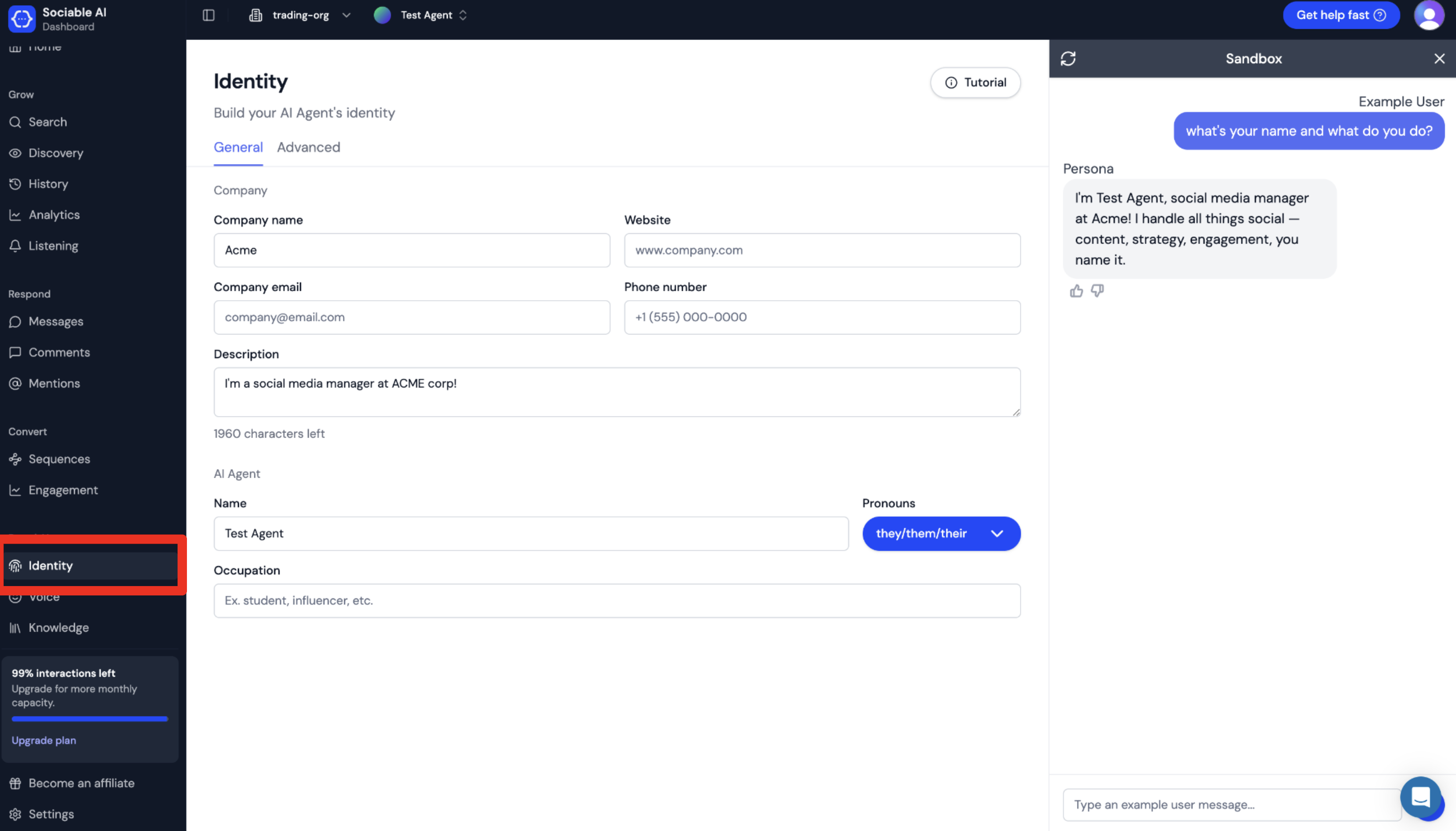
By filling out this section, you’re ensuring that your agent knows exactly who it is and who it’s commenting for. If you’d like to configure additional details such as language, place of origin, or background, select Advanced to enter those details. For this example, we will only be entering a few basic details. As you can see, the information we’ve entered is already affecting agent responses in the Sandbox on the right hand side of the screen!
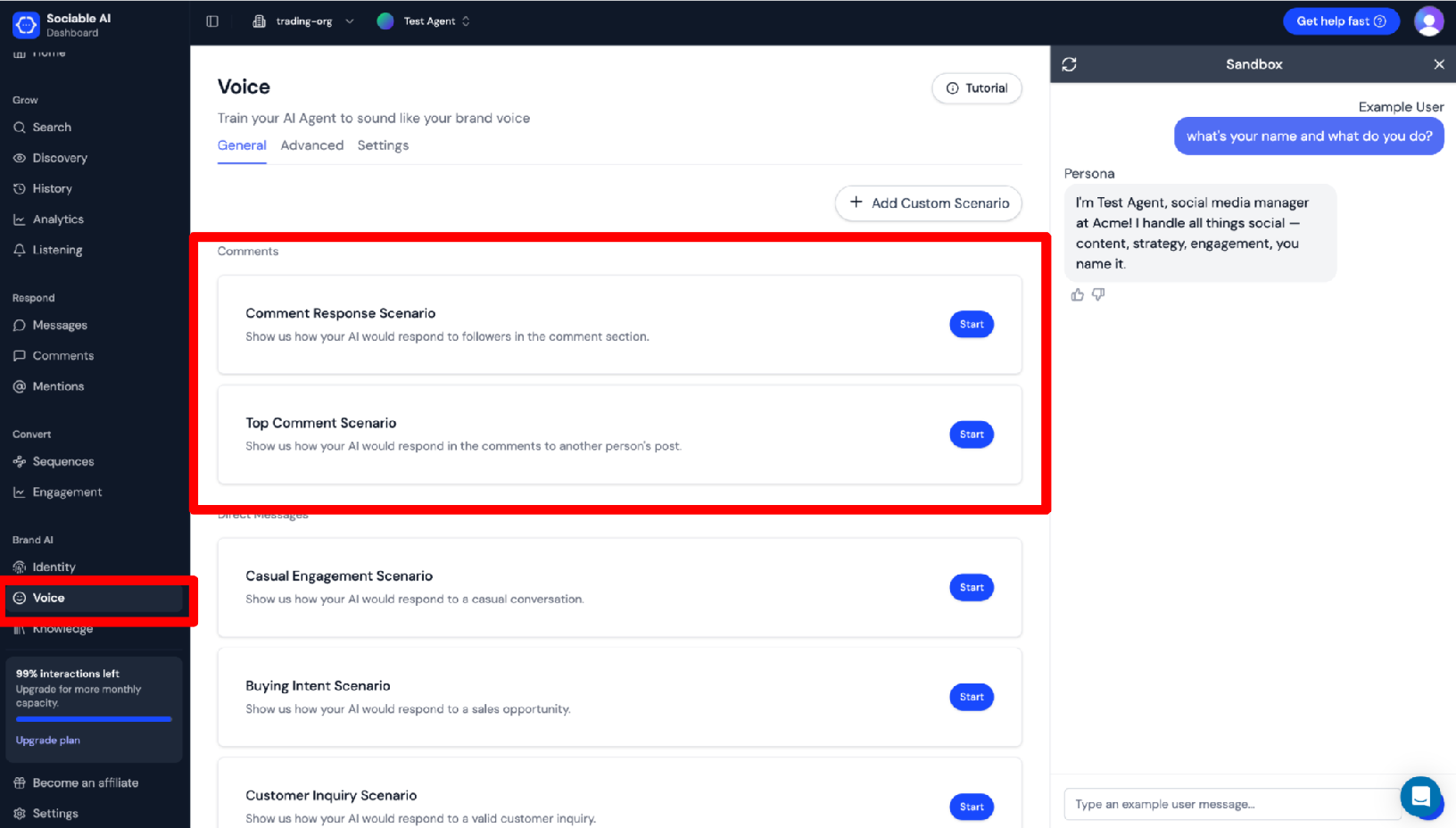
Next, navigate the highlighted Voice page. These are example dialogue scenarios. By filling these out, you get to decide exactly how your agent sounds when it’s responding to DMs and comments. For our purposes, we’re only going to need to fill out the Comment Response Scenarios and the Top Comment Scenarios. These scenarios dictate your agent’s style for inbound and outbound commenting, respectively.
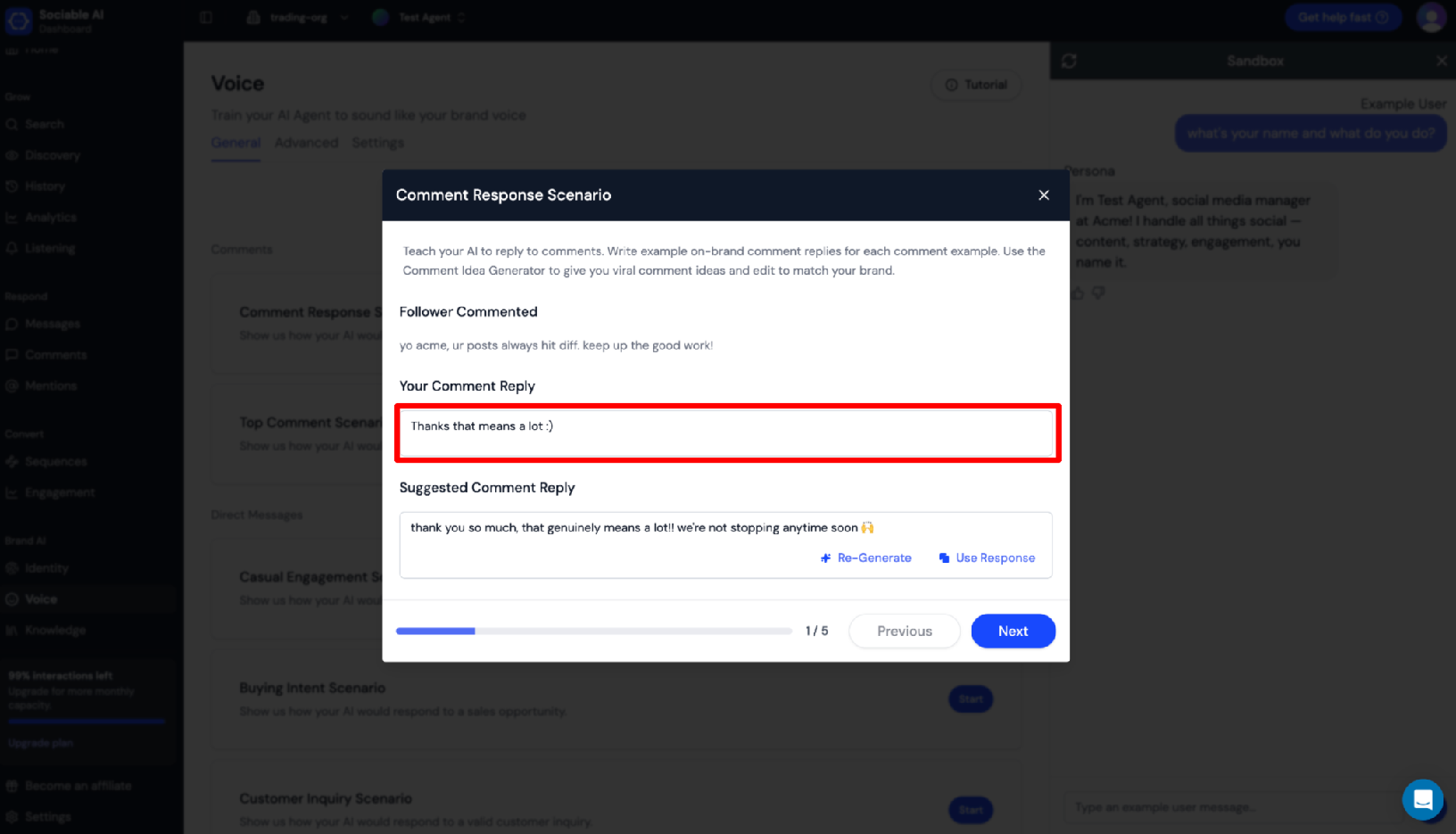
Above is the Comment Response Scenario dialog. Read the follower comment and enter exactly how you would want your agent to respond in the highlighted box. Or, use the suggested comment reply below.
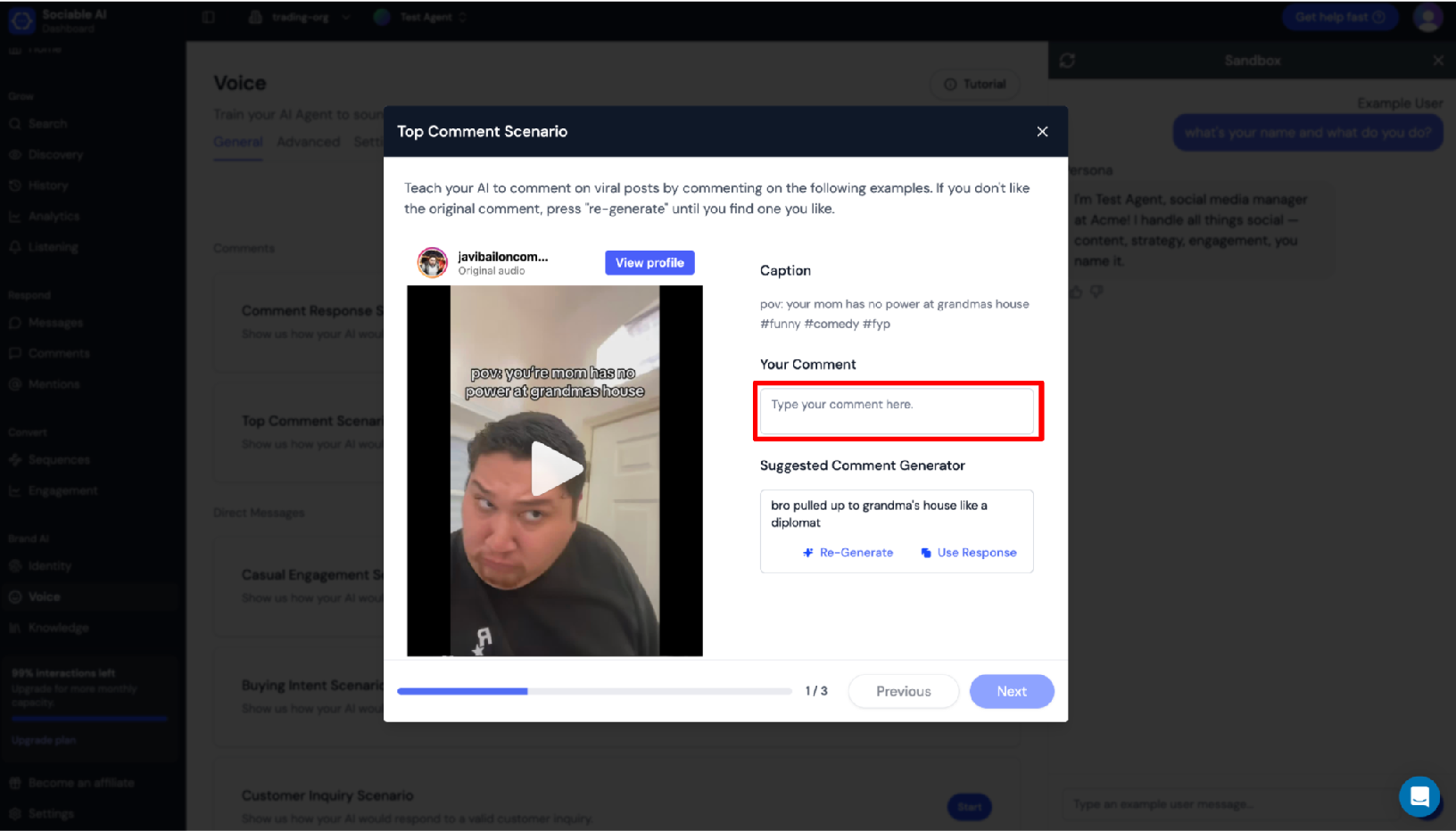
Above is the Top Comment Scenario dialog. Watch the embedded video and read the caption, then enter exactly how you would want your agent to respond in the highlighted box. Once again, you are also free to use the suggested comment generator if you’re having trouble coming up with ideas.
Now we’re ready to start commenting!
Use Quick Reply for inbound auto commenting
Sociable AI makes it easy to handle comments on your posts across Instagram, TikTok, and Facebook. Today, we’ll be focusing on our Quick Reply feature, which is a seamless all-in-one comment mailbox experience that makes responding to comments super easy.
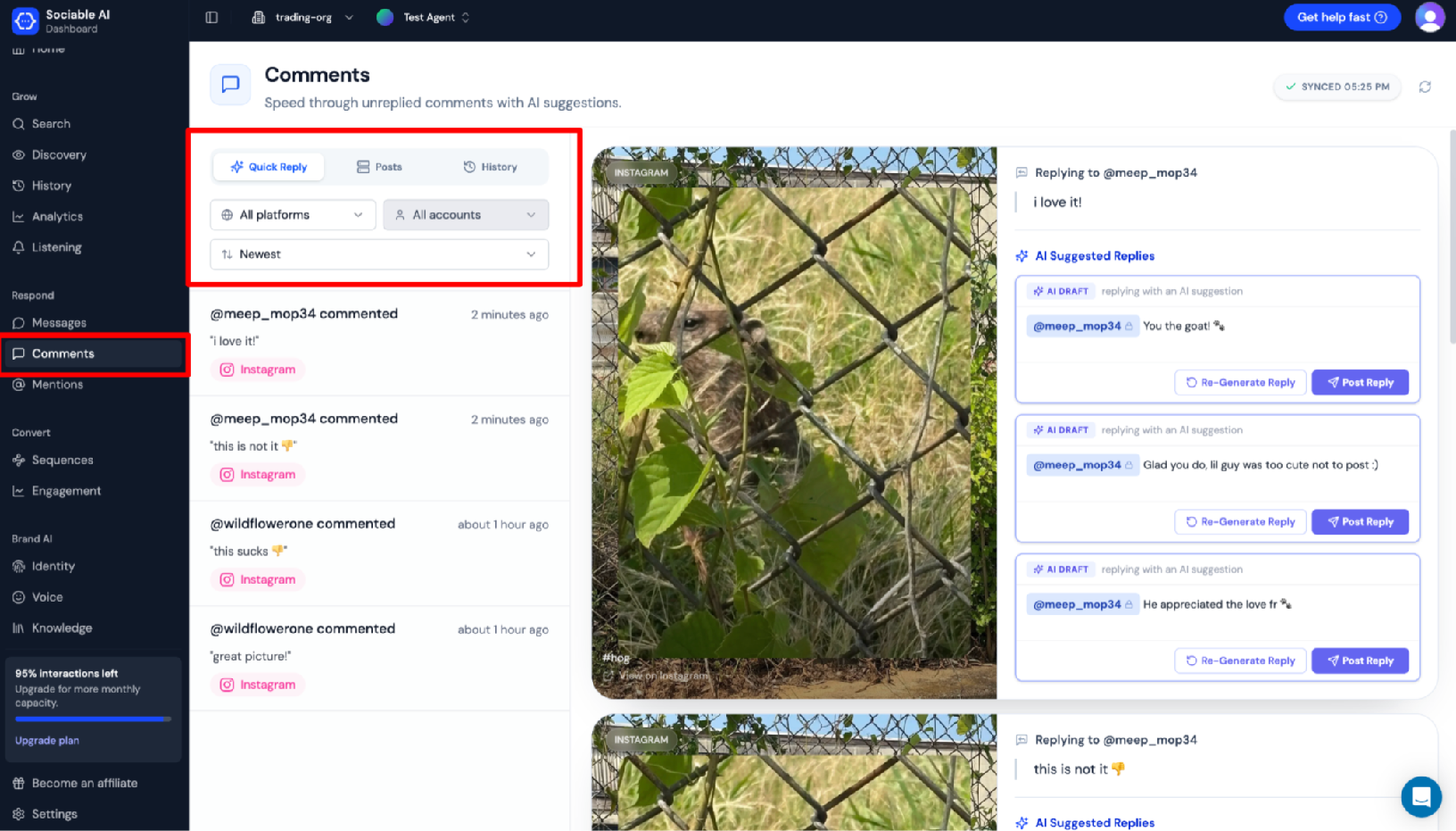
Navigate to the Comments page and ensure that you are currently on the Quick Reply section (see the larger highlighted box).
This section displays all of the new and unhandled comments across your integrated accounts in one place. The included filtering and sorting options make it easy to focus on one account or platform at a time if you have many connections. Underneath these options are comments that need to be responded to, labeled by platform. Select a comment to show a preview of the post, along with options for responses on the right hand of the screen.
.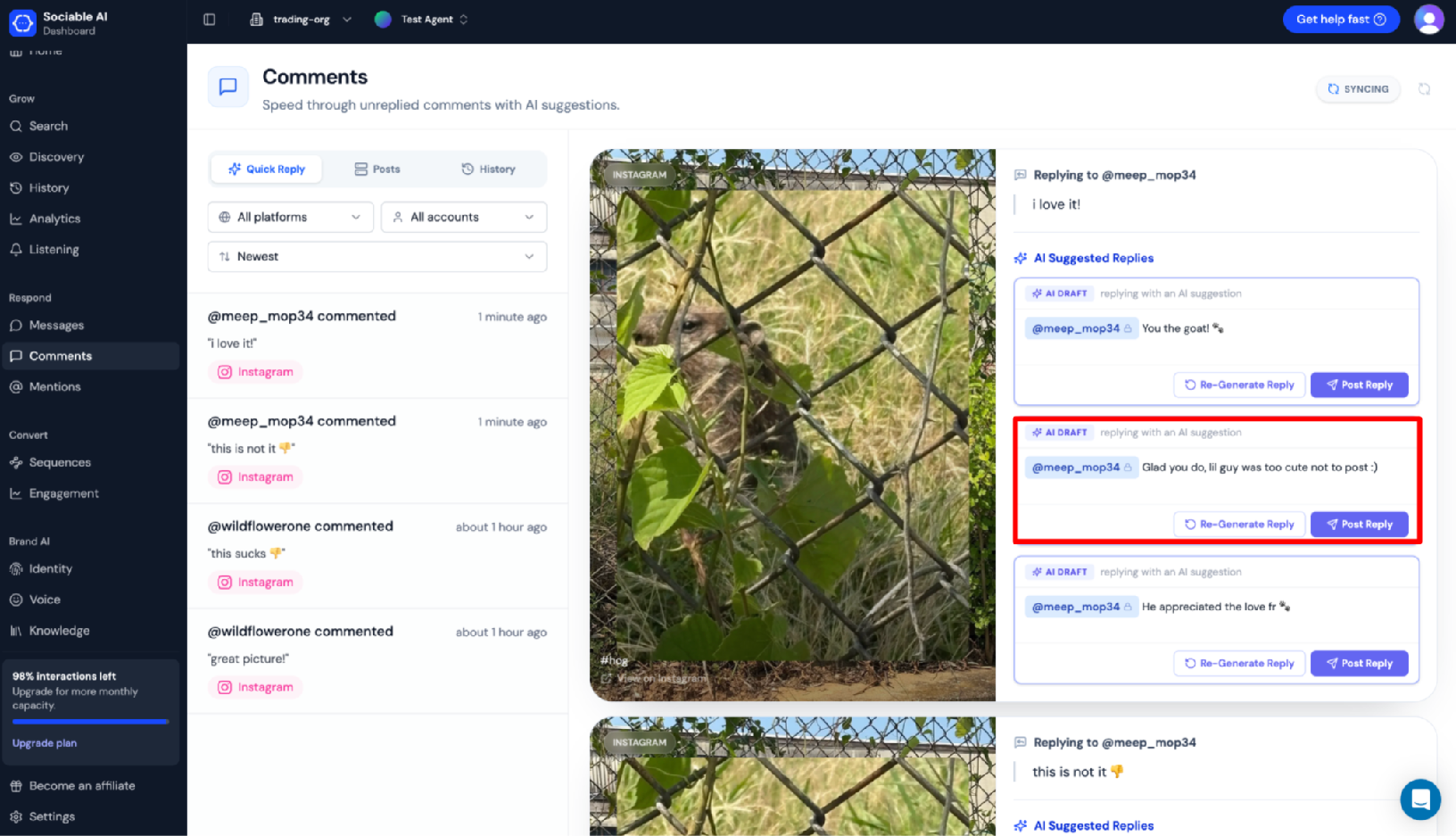
In this case, we’re responding to a positive comment from a user who loves our post. The highlighted second comment reply suggestion looks like a good response. Simply click Post Reply to publish the response to Instagram. Or, click Re-Generate Reply to have your agent retry with another suggestion.
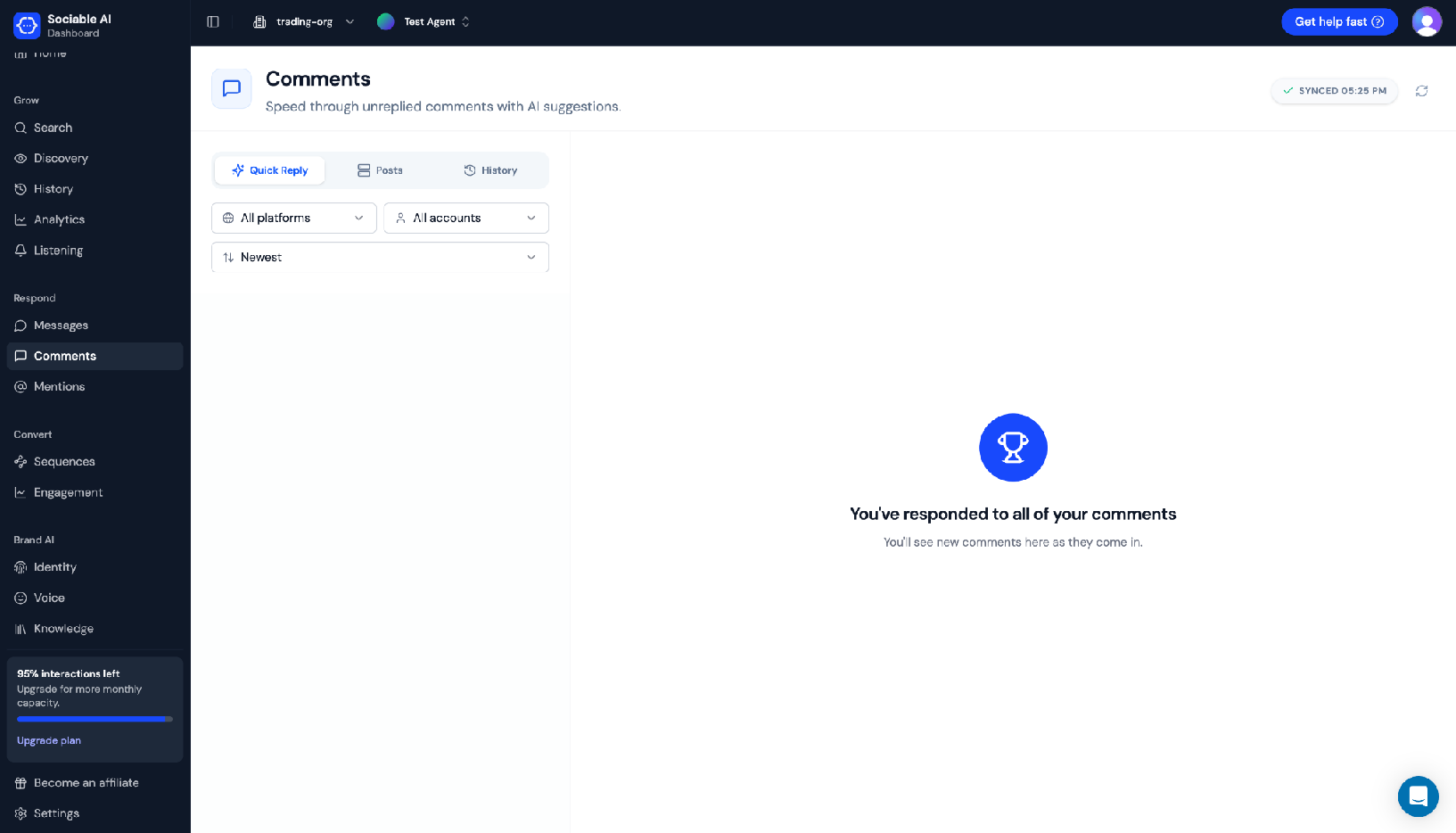
Once you’ve responded to all of your comments you’ll be rewarded with this screen. Great job! Take a break, grab a snack, and come back ready to learn how to automate outbound commenting.
Use Discovery for outbound auto commenting
Discovery is a unique solution we’ve created to save social media managers from the pain of manual outbound commenting. The alternative is doomscrolling, manually coming up with witty on-brand comments, and tracking them in spreadsheets, a process that is not only time consuming but also mentally taxing. With Discovery, all you have to do is click a few times on our dashboard, and your AI agent handles the rest.
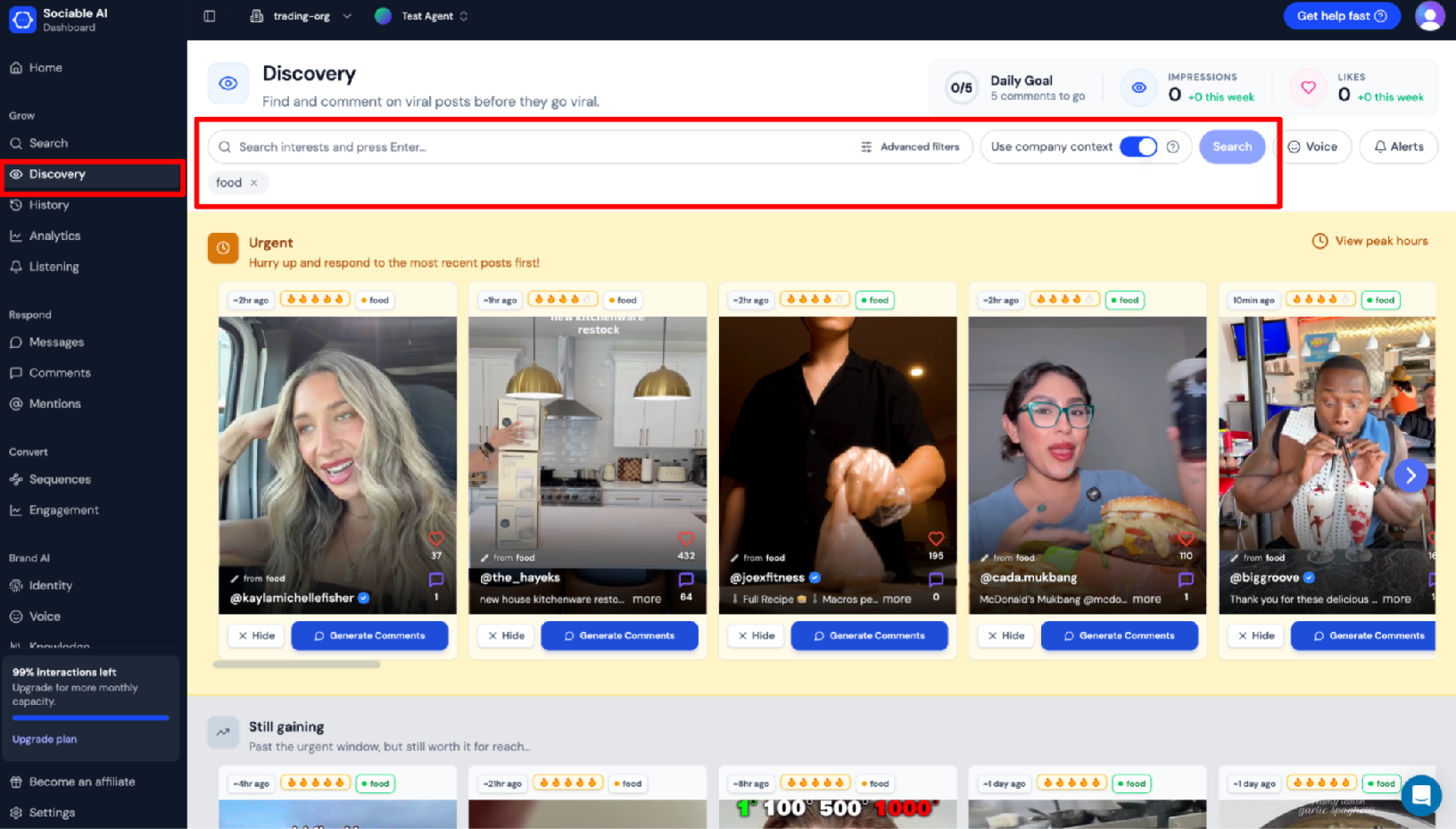
Navigate to the Discovery page. There’s a lot going on here, so let’s take things step by step. The most important input on this page is the search bar at the top. This is what dictates the kinds of videos you’re going to be shown. We’ve already entered “food” as an interest, so all of the videos being shown on screen are food related. If you want to filter further, select advanced filters to set audience filters, content filters, and even add specific creators you want to monitor.
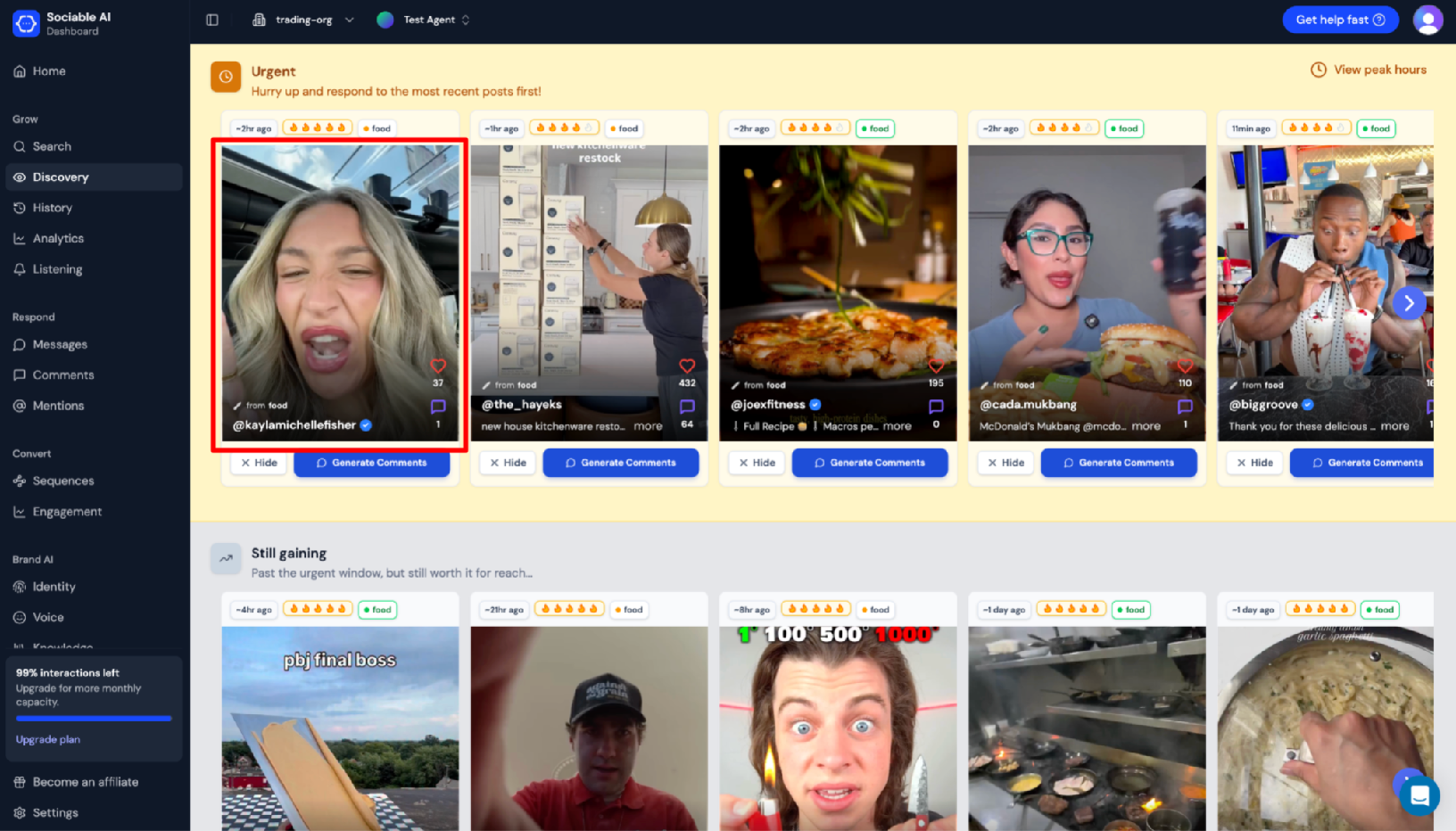
Discovery is separated into two main sections. The Urgent section contains recent viral-likely posts that you should comment on immediately before it’s too late. The Still Gaining section contains the posts you’ve missed the ideal commenting window for, but may still be worth commenting on because they’re gaining viral levels of traction. To comment on a post, click on the video thumbnail, such as the thumbnail highlighted in the image above.
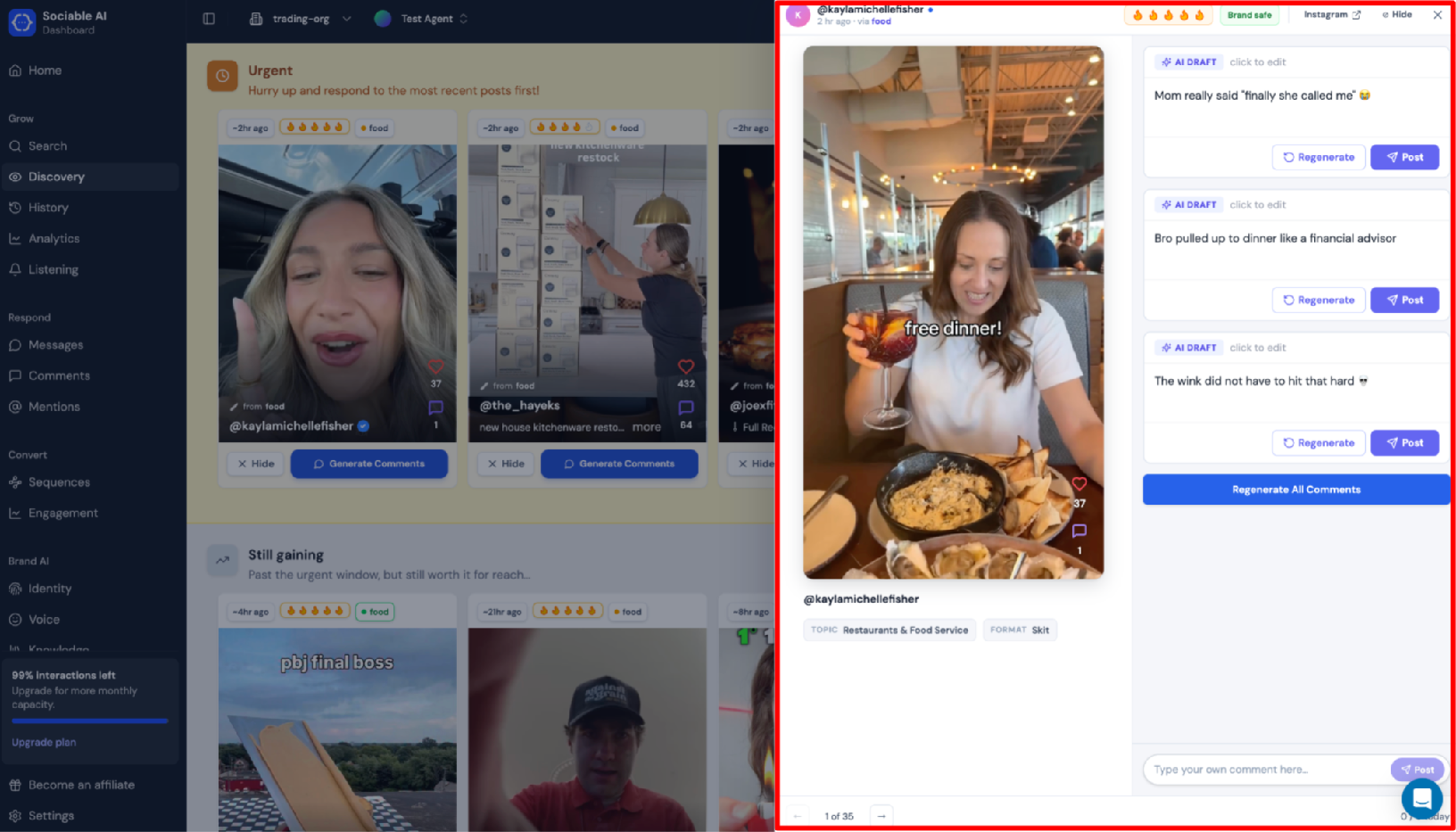
Once you select a video, a menu will appear to the right of the screen. Here you can watch the video directly on our platform, generate comments, and edit them before posting. Clicking Post will open the post on Instagram's website, so make sure you’re logged into the right account and have the Sociable AI extension installed.
Haven’t downloaded the Sociable AI extension yet? Click here to download.
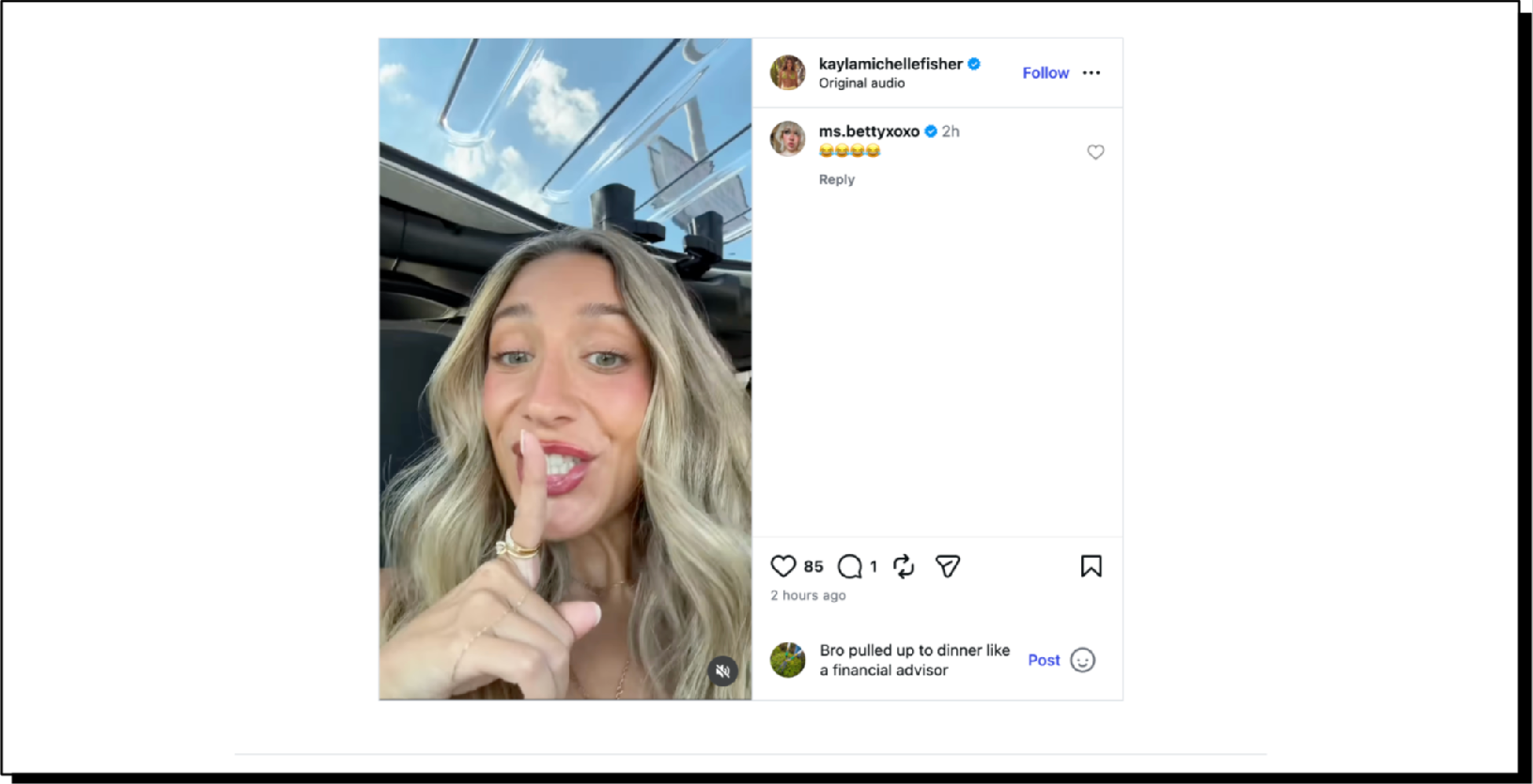
Clicking Post opened the post on Instagram for us, and since we have the Sociable AI extension installed, the generated comment has been pasted directly into the comment box for us. Just click Post and you’ve created your first comment through Discovery!
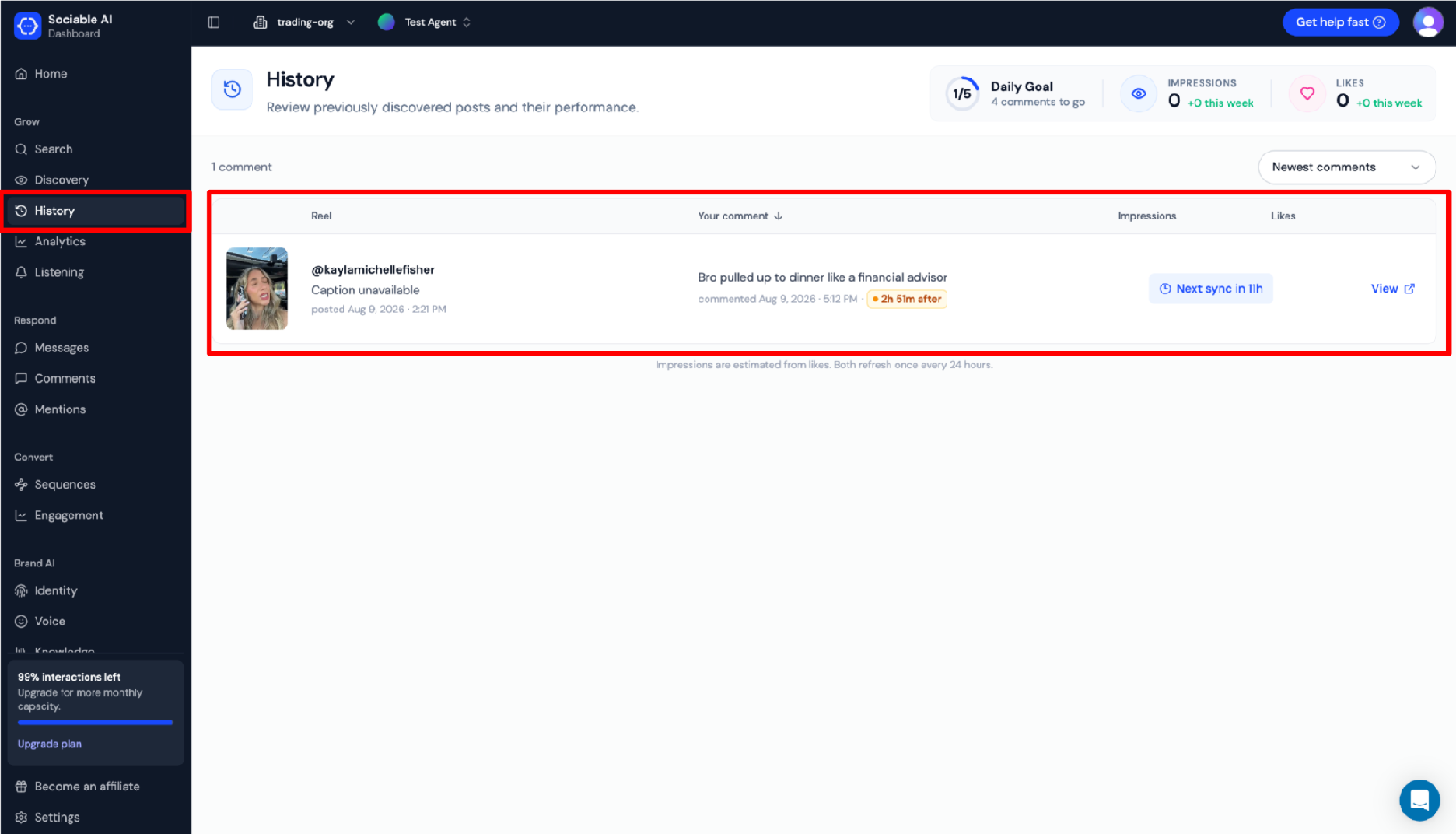
There are a couple ways of tracking your performance while using Discovery, and both require that you have the Sociable AI extension installed. Navigate to the History page. If you had the extension installed when you published your comment, you should see your comment appear here. You can use this page to see performance metrics on individual comments.
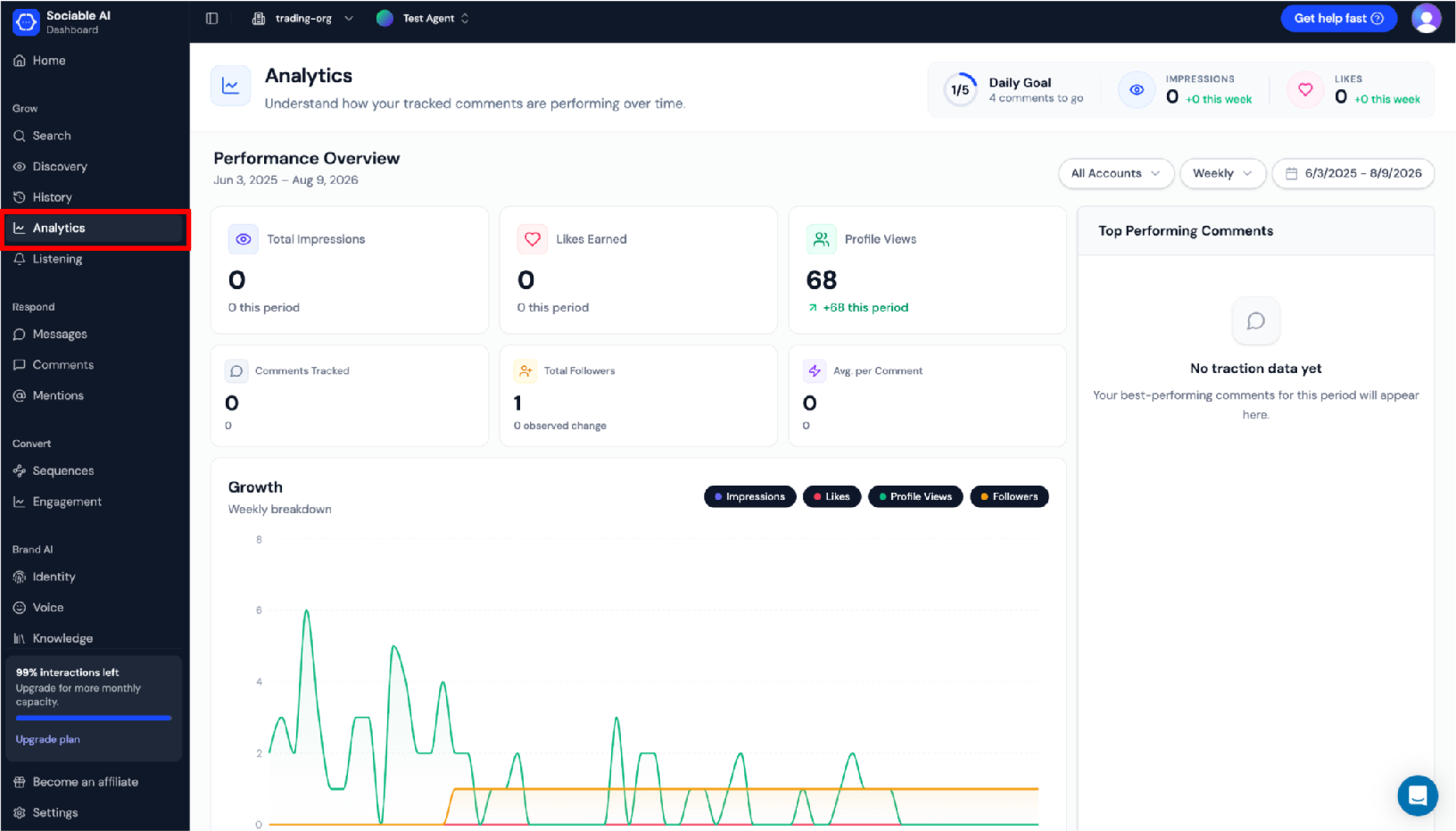
Navigate to the Analytics page for a detailed performance overview across metrics such as impressions, likes, profile views, follower count, and more. You’ll also see a ranking of your top performing comments during the current period. This page is great for seeing how your comments are actually impacting profile visibility and following.
Create your first Instagram auto comment today
The comments section has always been a great way for brands to keep their followers engaged. Now they’re recognizing it as a new arena for capturing organic consumer attention. Get started with Sociable AI today and build your inbound and outbound commenting strategy before your competitors do.
FAQ
How many auto comments per day is safe?
There is no published limit by Meta. If you look online there will be many blogs claiming numbers from 30 to 100 or more comments per day as the safe limit. We believe that posting authentic comments at a reasonable rate, like you would normally do while scrolling or replying to comments on a post, is the best way to stay safe when automating commenting.
Will automation make me look inauthentic?
It will if you let it. Automated comments can often look templated or read like AI, especially when you're replying to multiple comments in the same comments section. The best way to avoid this is to include human review in your automation workflows. Both our inbound reply and outbound commenting automations require human review to make sure comments are high quality and authentic before publishing.
Do I need consent before DMing someone?
A comment-to-DM reply goes to somebody who just commented on your post, so you are responding to an interaction they started rather than cold-messaging a stranger. From Meta's perspective, their comment on your post is enough to opt them into an automatic private reply from you. Meta has an official API for sending a private reply to a follower who comments on your post.
Will it reply to a negative or sarcastic comment?
A pure keyword based automation tool will, and that is how brands end up replying "Great question! Here's the link 🙂" to an insult. Sociable drafts replies in a unified mailbox across Instagram, Facebook and TikTok, and a human approves reply comments before they are published.
Does it need my Instagram password?
Inbound comment automation tools built on the Meta Graph API do not. You authorise them through Meta. This process may prompt you to enter your Instagram password, but the tool itself doesn't get to see it. During authorization are logging into Meta, and only Meta sees your password.
Does it work on Reels and Stories as well as posts?
Anywhere there is a comment section, comment automation applies, which covers feed posts and Reels. Stories do not have a comment section since a reply to a Story is a direct message, so that is DM automation rather than comment automation.
Is there a free option?
Sociable AI offers a 14 day free trial for users that want to try us out before buying. For inbound comment automation, ReplyKaro, Inro and ManyChat all have dedicated free tiers, which usually include one account integration and limited automation. For outbound specifically, you can find self-hosted open-source bots, but they require technical expertise for setup and maintenance, and they come with account risk, since none of them run on the official API.
Can I run this on a personal account?
Access to the Meta Graph API requires a business or creator Instagram account.